
As-built lighting documentation should describe the lighting that was installed, not simply reproduce the last approved design. Connect final drawings to actual driver products and settings, finish references, component codes and installation locations. Where the records disagree, show the difference and its resolution status rather than hiding it behind a new revision number.
For a fit-out contractor or design-and-build procurement lead, the task is reconciliation. The owner needs to find the right information for a particular light after the project team leaves. A complete folder can still fail that test if its files describe different versions.
Close the Gaps Between Approval and Installation
Build the as-built lighting package around three connected inputs: approved requirements, evidence of the installed condition and the disposition of any differences. Bring them together in a final document index. An observation establishes what is there; an approval establishes what was accepted. Neither should silently substitute for the other.
- Locate the installation. Connect the fixture type to the actual room, ceiling position or asset identifier.
- Identify the installed version. Record its drawing, driver configuration, finish reference and replaceable-component code.
- Explain differences. Link approved changes and keep unresolved questions visible with a responsible person and next action.
- Test retrieval. Start at a light and check that the index leads to the documents that apply to it.
This is a proposed coordination method, not a universal document specification. Agree the required files, formats, checking responsibilities and acceptance process with the owner and project team. The important relationship is between the records, not the number of documents submitted.
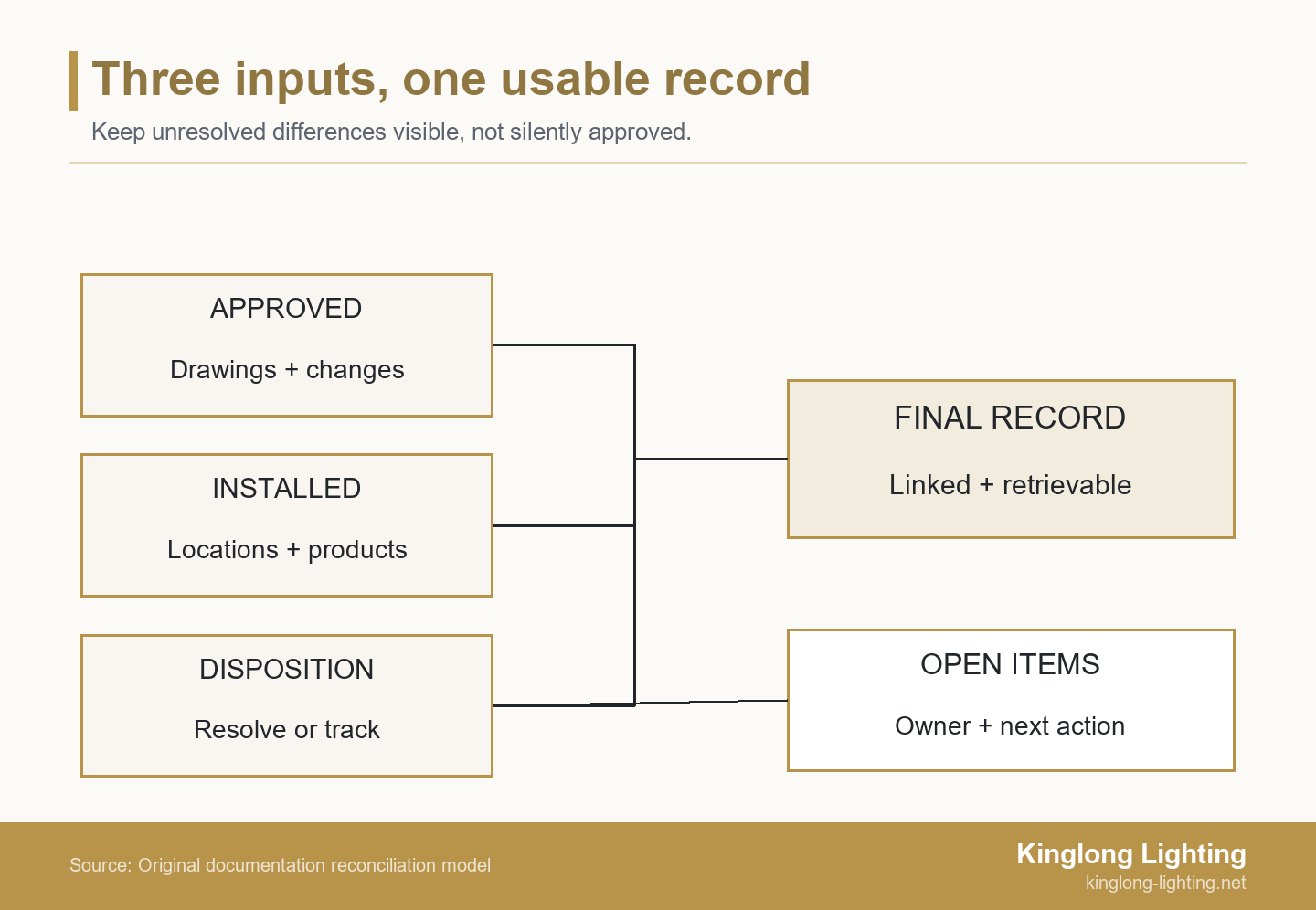
Separate Approved Design from the Installed Record
An approved drawing establishes a design baseline, but does not by itself confirm the completed installation. Collect site markups, relevant changes and confirmation of installed products before compiling the final record. Keep the approval references so a reviewer can follow how the installation departed from the baseline.
The federal guide specification UFGS 01 78 00 distinguishes contractor-maintained as-built markups showing actual conditions from final record drawings compiled from those conditions. That distinction is useful here; the guide’s federal project clauses do not automatically govern a private hotel contract. Use the terminology and obligations agreed for the actual project.
Establish the closeout scope before asking suppliers for a final upload. The lighting specification and procurement resources can help frame the questions, but the project’s own requirements determine what belongs in the handover. Identify which party supplies product information, which confirms site locations and which reviews the completed issue.
A useful baseline list names the approved luminaire schedule, coordinated drawings, material references and subsequent change records. Mark superseded files as history rather than letting them compete with the current issue. A filename containing “final” is not enough: give each document an identifier, revision and issue status that the index can reference consistently.
Build a Cross-Referenced As-Built Document Index
Use an as-built document index to connect each required record to its fixture or location, current revision and verification basis. The index should expose missing information and identify who will close it. Copy the field map below into the project workbook, then replace each entry prompt with a confirmed reference or an explicit open item.
| Record to index | Information to enter | Connection to check | Who confirms it |
|---|---|---|---|
| Lighting location drawing | Drawing ID, revision, room and fixture tags | Installed positions match the marked locations | Responsible site coordinator |
| Fixture and mounting detail | Applicable type, detail reference and revision | Installed assembly and interfaces use this detail | Supplier and responsible installer |
| Final luminaire schedule | Type code, installed variant and location range | Every installed variant has an applicable record | Package coordinator |
| Driver record | Manufacturer, exact product ID, confirmed settings and location | Product sheet and configuration apply to the installed unit | Responsible electrical specialist |
| Controls handover | Applicable circuit, group, address or scene reference | Locations connect to commissioned controls records | Controls specialist |
| Finish record | Approved sample code; batch reference where available | Actual locations and approved variations are distinguishable | Supplier and designated appearance reviewer |
| Component reference | Part code, drawing revision and applicable fixture variant | Reference identifies the part actually fitted | Supplier, with installation confirmation |
| Service and access information | Applicable instructions and access-detail reference | Method corresponds to the completed arrangement | Supplier and responsible site specialist |
| Changes and open items | Change reference, affected locations, status and next action | Approval evidence and installed facts are not confused | Named project decision-maker |
For every row, add working fields for file link, revision, confirmation evidence, checking date and unresolved action. A blank cell means the connection has not been established; it should not be interpreted as “not applicable” without a reason. Test file links using the owner’s permissions, not only the contractor’s account.
The separate categories matter. UFGS 01 78 23 treats manufacturer operation and maintenance data, wiring and control diagrams, and removal/replacement instructions as distinct parts of its package. In a lighting handover, a product data sheet should not be assumed to answer where the driver is, how it is controlled or how the installed assembly can be accessed.
Kinglong’s published hospitality process describes construction drawings, physical material and sample confirmation, and final sign-off documentation. These are supplier-side inputs. Confirm which actual records are included in the project scope, then combine them with the contractor’s site evidence; a supplier drawing alone cannot establish the final site condition.
Record the Driver That Was Installed, Not Just the Family
A useful driver record connects product identity, installed settings and relevant controls information. Keep those fields distinct. Two units can have the same product identity but different confirmed settings, while a replacement product may need a separate technical review even when the luminaire’s appearance has not changed.
Keep Product Identity and Configuration Together
Driver configuration means the installed driver’s confirmed settings and enabled functions, separate from its product identity. Record the manufacturer, full model or orderable product identifier, applicable data-sheet revision and physical location. Add the installed configuration and the evidence used to confirm it; do not copy a generic family sheet into every location record and assume the job is done.
For example, Tridonic’s technical datasheet identifies its driver with both a product designation and an article number. Capture the identifiers applicable to the actual product rather than abbreviating them to a manufacturer name. This is an identification example, not a recommendation for that driver or proof of compatibility with a particular light.
Where applicable, the electrical specialist should confirm output settings, control mode and the reference to the configuration record. Distinguish a device’s available range from its actual programmed value. Labels and existing commissioning records may provide evidence; obtaining missing information should follow the project’s safe-access arrangements, not a request for unqualified staff to open energized equipment.
Connect Driver Records to the Controls Handover
The controls handover should make it possible to locate the record governing each installed light. Link the fixture location to the applicable circuit, control group, device address or scene schedule where the system uses those features. Record the controls file or report reference and who supplied it, rather than placing an unexplained address beside the driver model.
Electronic product data can contribute, within its scope. The DALI Alliance explains that D4i drivers can store and report luminaire, energy and diagnostics data in a standardized format. This capability belongs to the relevant D4i products; do not assume that every DALI driver offers it or that the data has been populated correctly in this installation.
A product-data export does not, by itself, establish the room naming, scene intent or acceptance status of the project. Retain the commissioned controls records and connect them to the installed location list. If a room name changes after commissioning, update the mapping so the operational team does not lose the route from the room to its controls information.
Tie Finish and Component Codes to the Installed Locations
Finish and component records need location links, not just attractive sample photographs. Connect the approved finish reference and component drawing code to the installed fixture variant. Retain batch information when it is available and relevant; if a batch number was not supplied, identify that gap instead of inventing a code that appears traceable.
A finish description such as “brushed brass” leaves several questions open. Which approved physical sample is the reference? Does the code apply to the canopy, suspension and decorative body? Were visible variations accepted in particular areas? Record the sample identifier and relevant approval, then distinguish an accepted area-specific finish from an unexplained mismatch.
The same approach applies to glass, crystal or other decorative components. A component code is useful only when the associated drawing or supplier record identifies the applicable geometry, mounting arrangement and revision. Similar silhouettes do not establish interchangeability. If a part has no manufacturer code, agree a controlled project reference linked to an identifiable drawing rather than treating a photograph as the whole specification.
The decorative-lighting project portfolio gives visual context for installed forms and settings. Use that context to discuss which assemblies and finishes need identifying. Portfolio images are not evidence of a hidden driver, an accepted component substitution or a particular batch; the project record needs its own supporting information.
Keep retained finish references distinguishable from replacement stock. The handover index should point to where the approved reference can be found and to the applicable component list, while the stock record tracks quantities available to use. That prevents someone from consuming the only appearance reference during an early maintenance visit.
Resolve Differences Without Turning Records into Approvals
Record the observed condition, its approval status and the next action separately when installation evidence disagrees with the approved set. Updating an as-built drawing documents a condition; it is not, by itself, authorization for a substitution. The project’s responsible decision-makers need to establish whether the difference is accepted, requires correction or remains unresolved.
Use this discrepancy register alongside the document index. Keep one row for each issue, and split rows when affected locations need different decisions.
| Identify the difference | Record the basis | Assign the next action | Close the linked records |
|---|---|---|---|
| Issue ID; affected locations; installed product or condition | Approved baseline; field evidence; current approval status | Named reviewer; question or correction required; agreed due date | Disposition reference; revised file IDs; confirmation and checking date |
The row is complete only when its stated resolution can be followed into the affected documents. An accepted driver change may alter the schedule, configuration record and service reference without changing a ceiling location. A relocated remote driver may affect access and wiring information as well. Check the consequences of the particular change rather than reissuing unrelated files automatically.
If the difference changes design intent, product selection or commercial scope, use the decorative-lighting value engineering guide to prepare the review questions. Do not reclassify a cheaper or more convenient substitute as a documentation correction merely because it is already installed.
During a phased handover, state the boundary of each issue: areas covered, current revisions, exclusions and outstanding actions. A partial package may be useful, but should not appear to certify unresolved areas. Keep safety-related uncertainties with the responsible qualified specialist and the project’s acceptance process; a document controller cannot close them by changing a status label.
Test the Record Against an Installed Variation
A local driver variation can make a complete-looking type schedule inaccurate. The following invented example shows why the location list matters even when all the wall lights look alike.
Example: a Driver Change in Four of Twenty Rooms
In this illustrative example, a fit-out coordinator is closing a package for 20 rooms with the same wall-light type. Four rooms contain a different driver product. The final schedule names only the original driver. Safely obtained label records expose the difference across those 4 rooms, yet the package contains neither a linked approval nor confirmation of the changed configuration.
The visible fittings do not explain whether the second driver was an accepted substitution or an unapproved change. The coordinator identifies the affected rooms and asks the responsible electrical and project reviewers to establish its status. Issuing one unqualified driver reference for the whole room group would conceal the variation and could direct future maintenance staff to the wrong information.
Suppose the review confirms that the substitute is accepted with a documented configuration. The team records that disposition, identifies the locations using each driver and updates the schedule, applicable electrical details, configuration record and service reference. If the review does not support acceptance, the issue remains open for appropriate correction; the drawing is not simply relabelled “approved.”
The team then checks the four affected locations against the corrected package and tests whether the owner can retrieve the right record for both installed versions. Any remaining confirmation is listed as an open action. These counts and outcomes are hypothetical, not Kinglong fieldwork or a rule for how many fixtures to inspect. Actual verification coverage, electrical work and acceptance follow the project’s agreed procedures.
Issue a Package the Owner Can Retrieve and Maintain
Before issuing the package, test the route from a physical light to its current location drawing, confirmed driver configuration, applicable component reference and service instructions. Ask the owner’s representative to perform a lookup using the proposed handover access. A package that works only through the outgoing contractor’s personal folders is not a durable handover.
The National Institute of Building Sciences describes COBie handover planning in terms of what data is wanted, when it is wanted, and who will deliver and review it. Apply that discipline to the lighting package without claiming that this index constitutes a compliant COBie deliverable. The owner’s actual information requirements determine any structured-data submission.
- Confirm the index covers the agreed locations and installed variants.
- Check current file links and revisions with the owner’s permissions.
- Retain change references and list unresolved items with their next actions.
- Record the issue date, recipients and person responsible for future updates.
Where supplier information is missing, bring the fixture schedule, marked-up drawings and unresolved discrepancy list to discuss the supplier-side documentation with Kinglong. Ask which supplied-product records are available and which points require clarification, so the response can be incorporated into the project package. Site verification, specialist review and final acceptance remain with the parties appointed for those tasks.
Frequently Asked Questions
Can photographs replace as-built lighting drawings?
Photographs can support an installed record, but they do not replace the required drawings and linked schedules. A clear image may confirm a label, finish or visible location without establishing concealed routing, dimensions or the complete circuit arrangement. Link photographs to the relevant location and record, and provide the drawing or other deliverable required by the project.
Should unknown driver settings be copied from the approved submittal?
No; keep an unverified installed setting visible as an open information item. The approved submittal shows the intended configuration, not necessarily the value programmed on site. Identify who can confirm the installed setting through appropriate records or a safe specialist check. Record the confirmation method and result instead of turning an assumption into an apparently verified field.
Who signs off the final lighting documentation?
The project’s agreed responsibility and acceptance process determines who signs off each part. A supplier may confirm its product information while the installer confirms locations and the controls specialist confirms commissioning records. The designated reviewer then accepts the package under the project arrangements. Do not treat one supplier’s product confirmation as approval of every site condition or contractual requirement.
What happens when a driver is replaced after handover?
Update the affected installed record and its linked service information after the approved replacement. Record the new product identity, confirmed configuration, relevant location and work reference, then check whether controls or component information also changed. Retain the previous record as history rather than leaving two apparently current versions. The operational team should know who maintains those links after the original project closes.