
Assign one stable comment ID, identify the fixture, view and reviewed revision, record the agreed answer, and check every affected deliverable before closing the comment. That keeps a designer’s request connected to the CAD geometry, visual presentation and shop drawing instead of letting each file accumulate its own interpretation.
For an interior or lighting designer, the difficult moment is often not receiving feedback but deciding which instruction the manufacturer should follow. An attractive revised image may still sit beside an older dimensioned drawing. The workflow below provides a reusable register and a way to check whether an answer has actually reached the files people will use.
Control the Comment, Not Just the Marked-Up File
A reply records an answer; closure needs checked implementation in the affected files; production authorization is a separate project decision. Treat those as different states, even if a review application offers only a simple resolved button.
Give the issue an identity that survives a new export or drawing revision. Keep the original question, the agreed decision and the implementation evidence distinct. Otherwise, a comment can disappear from a markup layer while the requirement remains unresolved in the manufacturing package.
This is a project coordination method, not a universal contractual approval system. Agree who may interpret design intent, who assesses technical consequences and who authorizes the named work. A register makes those decisions visible; it does not create authority that the project has not assigned.
Collect Comments Without Losing Their Original Context
Keep the original remark and its source, then write one actionable request without silently changing design intent. Preserve the marked-up file or message, reviewer, date and relevant page or image so someone else can understand what prompted the request.
Kinglong’s lighting project resources offer related design and procurement reading. They can help the team frame its review questions, but the project’s own marked-up sources remain the evidence for what was requested.
A note saying “make it lighter” needs clarification: lower visual mass, a paler finish or less physical weight could lead to different changes. Record the ambiguity and ask the originating reviewer to confirm the intended result before converting it into an instruction.
Bluebeam Revu can generate a Markups List Summary in CSV, XML or PDF, or print it; Revu 21 Basics users have PDF output only. Such an export is useful for collecting annotations, but it does not itself interpret the request or update the CAD model.
For meeting or messaging feedback, capture the confirmed wording and its source reference in the same intake log. Do not let an undocumented verbal instruction become a second, invisible approval channel.
Tie Each Comment to a Fixture, View and Revision
Identify fixture and component, location or view, source file and reviewed revision so another reviewer can reproduce the concern. A page number alone is fragile when a later export rearranges the sheets; pair it with the drawing or view identifier.
For a pendant, distinguish the ceiling canopy from the decorative body, suspension and light-emitting elements. A circled shape on a perspective may refer to only one of those parts. Add the room or fixture instance when identical-looking fittings have different installation conditions.
In buildingSMART BCF-XML, each comment has a unique Guid and can reference a viewpoint. That is a concrete example of keeping the discussion and its viewing context identifiable; it does not mean a lighting project must adopt a BIM platform.
Use the same principle in a simpler file package: retain the comment ID when the source image is replaced, and add the new evidence beneath it. Do not overwrite the old view until its connection to the decision is recorded. A reviewer should be able to distinguish the image that received the comment from the image offered as proof of correction.
A Reusable Designer Comment Register
A comment register is a shared log connecting each request with its decision and checked implementation. Copy the following fields into a spreadsheet or review system; keep one record for each distinct decision rather than one record for every screenshot.
Use separate register fields for the source, object and view, requested change, discipline and decision owner, answer, affected files, closure evidence and status. Keep the ID unchanged as answers and evidence develop.
| Field | What to enter | Why the reviewer needs it |
|---|---|---|
| Comment ID and source | Stable issue ID; original file or message, reviewer and date. | Recover the actual request and connect duplicate remarks. |
| Object and view | Fixture code, affected component, room or instance, sheet and view. | Find the same detail in different representations. |
| Reviewed revision | Revision of the file on which the remark was made. | Avoid treating an old markup as a comment on the current issue. |
| Requested change | Original wording plus a clarified, actionable interpretation. | Keep clarification visible instead of quietly rewriting intent. |
| Discipline and decision owner | Design, engineering, site or commercial question; person authorized to decide. | Route a conflict to the correct decision rather than the fastest responder. |
| Answer and implementation owner | Agreed response, reason for any rejection, and person updating the files. | Distinguish a decision from a promise to draw it later. |
| Affected deliverables | Each CAD, rendering, shop drawing or schedule needing review; include no-change reasons. | Expose an overlooked file branch. |
| Closure evidence | Issued file revisions and view locations, comparison result, checker and check date. | Verify the actual output rather than a reply saying “done.” |
| Status and remaining action | Open, clarification needed, answered, implemented awaiting check, closed or reopened. | Show what happens next and avoid treating all responses as closure. |
Kinglong Lighting describes drawing review for feasibility, material selection and structural optimization in its custom lighting development process. These are useful technical questions to attach to the register. Agree the review scope; do not assume the manufacturer can decide the designer’s aesthetic preference or operate the client’s review platform.
Resolve Conflicting Instructions Before Editing
Escalate incompatible instructions to the person with the relevant decision authority; record which instruction is superseded rather than choosing the latest message automatically. A later email can still come from someone who cannot approve the affected design or commercial consequence.
Separate appearance, buildability and project constraints. The designer can explain the desired silhouette; the manufacturer’s engineer can identify how a smaller canopy affects the proposed component arrangement; the site team can confirm the ceiling interface. None of those answers alone necessarily settles the others.
Where the requested appearance cannot be achieved with the current arrangement, keep the original request visible and list the alternatives for decision. Record the chosen option and any conditions, including a new sample or revised technical detail. Do not hide an engineering objection by marking a visual comment closed.
Assign an implementation owner after the answer is agreed. If the answer changes while drawings are being edited, stop the affected update and record the new decision against the same issue history. Preserve the superseded instruction so the team can explain why an apparently completed edit was not issued.
Carry the Decision into Every Affected File
For each affected CAD file, rendering and shop drawing, record the new revision or a reason no change is needed, then inspect the actual issued output. Different file types represent different parts of the same decision; matching filenames are not evidence that their contents agree.
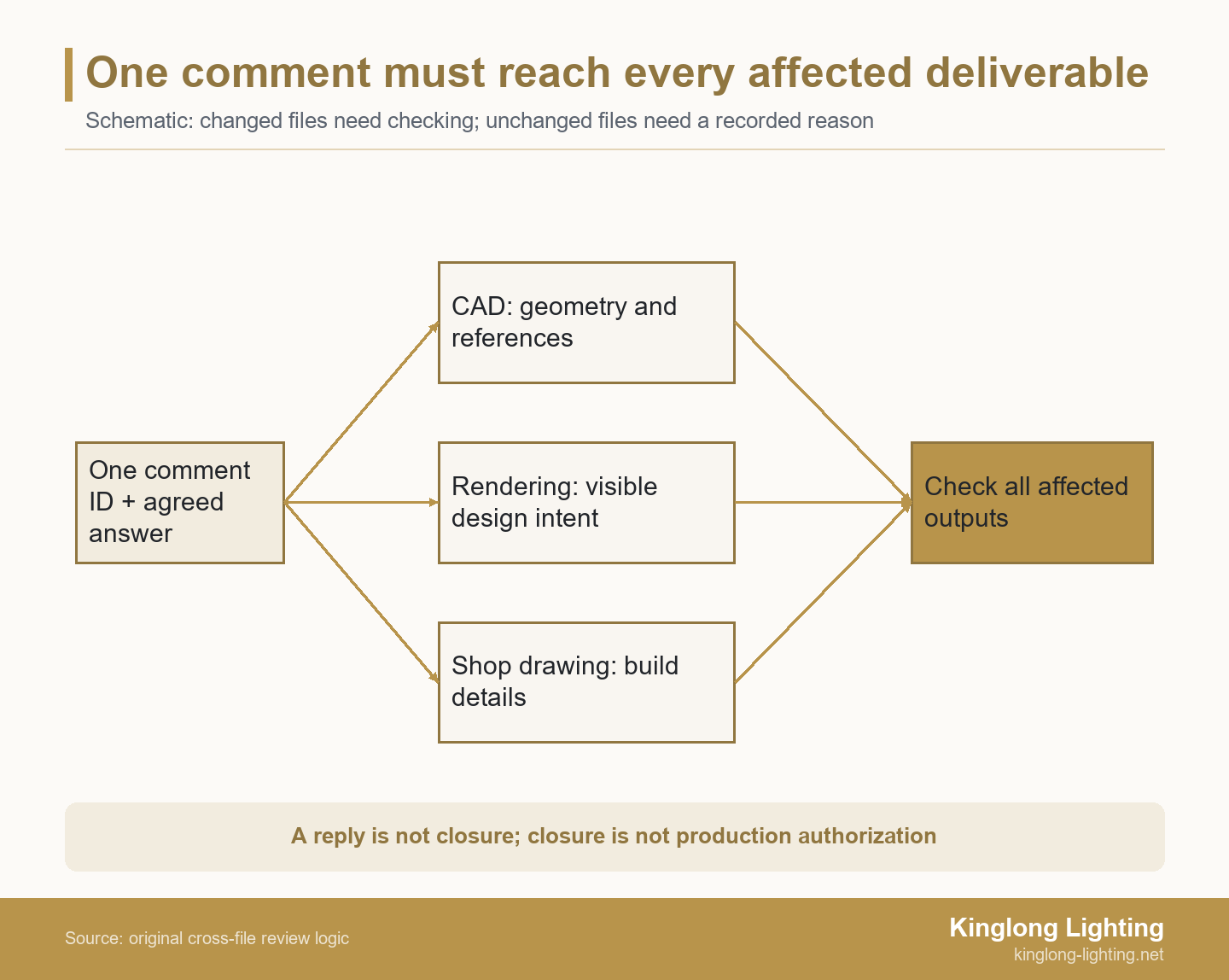
The CAD author checks the geometry and relevant references. The visualization author checks the intended shape, material and visible relationships in the new image. The shop-drawing author checks dimensions, sections, component arrangement and manufacturing notes affected by the answer. Include schedules or material references when the change reaches beyond those views.
AutoCAD’s Reload All References updates file references to use the most current version; referenced files also update when the host drawing is opened. That function does not prove that a separate rendering or PDF shop-drawing export has been regenerated from the corrected content.
Open the deliverables intended for issue, not just the authoring application. Compare the same fixture and view against the agreed answer. If a file genuinely needs no change, state why: an appearance adjustment may leave a wiring note unaffected, but that conclusion should follow an impact check rather than an empty cell.
A project portfolio can help the designer explain the intended fixture-to-room relationship. Treat those images as visual context, not proof that the current CAD and manufacturing package are coordinated.
Issue a Traceable Revision Package
ASME Y14.35 describes practices for revising drawings and associated documents and methods for identifying and recording revisions. Its public scope does not establish that your project has adopted that standard or require a particular revision code here.
Use the project’s agreed naming and revision convention. List every issued file with its revision and purpose, identify what it supersedes and connect the changed documents to the comment IDs they address. If a document remains unchanged, include its current revision rather than suggesting it has been newly revised.
Keep the issue package accessible at a stable location and distinguish it from working copies. Preserve earlier issues for traceability while making their superseded status clear. A folder called “latest” is not sufficient if recipients cannot identify the actual package or may still act on an older downloaded copy.
Close the Comment with Evidence, Then Confirm Permitted Use
Close an implemented comment only after the designated checker compares the agreed answer with all affected current files and records the result. The evidence should identify the files and views checked, not merely the person who uploaded them.
UK BIM Framework Guidance Part C distinguishes information shared for review and comment from published contractual information that has been authorized and accepted. This is a distinction within that named guidance, not a reason to impose its status codes on every lighting project.
Keep comment status and document-use permission in separate fields. A closed appearance comment might support the next sample review while technical checks or production authority remain outstanding. For a rejected or withdrawn request, record the reason and decision owner instead of inventing evidence of an implemented change.
If an alternative changes cost or design scope, the decorative lighting value-engineering guide can help frame the separate review of what should be protected. Do not disguise a commercial compromise as a purely clerical comment closure.
Illustrative Review: A Pendant Change Across Three Files
This illustrative package contains 12 lobby pendants and 3 review files; comment C-01 changes the visible canopy outline, but is not closed until the CAD, rendering and shop drawing agree. It is not a Kinglong project record or a measured result.
The designer marks the canopy on rendering VIS-A and asks for a slimmer outline. The team agrees a revised outline subject to the manufacturer’s technical check. A reply says the image is corrected, but the checker finds that the proposed issue still contains CAD-A and shop drawing SD-A with the original outline. The reply therefore records progress, not closure.
| Record for C-01 | Agreed action and owner | Evidence needed for the closure check |
|---|---|---|
| CAD-A → CAD-B | CAD author updates the canopy outline and the affected component arrangement after technical review. | Checker opens CAD-B and compares the relevant geometry with the agreed answer. |
| VIS-A → VIS-B | Visualization author regenerates the affected view using the agreed outline. | Checker compares VIS-B with the decision and CAD-B; an attractive image alone is insufficient. |
| SD-A → SD-B | Shop-drawing author updates the affected dimensioned view, section and notes. | Checker inspects the issued SD-B export against CAD-B and the agreed answer, then records the result. |
The team reopens the issue for the missing file updates, obtains the relevant technical answer and prepares the revised package. Closure follows only when the checker has inspected the listed outputs and recorded agreement. If a mismatch remains, the issue stays open; if the correction passes, the project still separately determines the permitted use of that package. No saving or recovery duration is assumed.
Send the Manufacturer a Reconciled Review Package
Send the current register, marked-up sources, fixture codes, file revisions, agreed answers and unresolved decisions for a scoped drawing-feasibility discussion. Include which files the manufacturer is expected to assess and which design questions still await your team’s decision.
You can send the reconciled review package for discussion with Kinglong. Ask the team to review drawing feasibility, materials and structural implications, then agree the technical review scope and missing inputs. The discussion is not a promise of design approval, a fixed response time or an automatic production release.
Frequently Asked Questions
Can a rendering approve a dimension that is missing from the drawing?
No; a visual impression does not define an omitted manufacturing dimension. Ask the designer and technical author to identify the intended dimension and its reference points, then place the agreed value in the relevant controlled drawing. A perspective can communicate proportion without supplying a buildable measurement. Do not scale a screenshot or treat a pleasing image as a substitute for an explicitly reviewed dimensional requirement.
Should every repeated markup receive a new comment ID?
Not when it is the same request about the same object and decision; link the duplicate evidence to the existing issue. Keep the additional reviewer and source references so no feedback disappears. Create a separate linked issue when the new remark concerns another component, introduces a different requested result or needs a different decision owner. This prevents duplicate closure counts without merging genuinely different requirements.
What if the designer comments on a superseded revision?
Keep the source remark and compare it with the current package before accepting, rejecting or reopening it. If the current issue already implements the request, identify that evidence for the reviewer rather than editing the files again. If it introduces a new requirement, route it through the current decision process. Do not discard the remark solely because its source is old, or silently apply it to an unrelated current view.
Do we need BCF or a specialist review platform?
No; a shared register can work if it preserves identity, source context, decisions and verifiable closure. A spreadsheet with controlled access and clear links may be suitable for a small package. Choose a specialist system when the project’s collaboration needs justify it, and confirm its export, permissions and version behavior. Software selection does not remove the need to assign decision owners or check the actual deliverables.