
Make the Revision Log Point to an Approved Package
A custom lighting revision log connects each change request to the affected fixtures, document revisions, impact review, approval evidence and production release. Its purpose is not simply to list the newest drawings. It lets the designer, buyer and manufacturer identify the same approved instruction, including anything still on hold.
Start before concept comments become workshop instructions. Give each request a stable identifier, preserve its source, and link the exact files defining the proposed change. Record who accepts the design, who accepts its commercial consequences and who authorizes the affected manufacturing work. The template below provides a practical starting point; adapt its responsibilities and status labels to the actual project agreement.
Keep Changes, Revisions and Release Decisions Separate
A change request describes a proposed difference; a document revision identifies an issued file; a release decision permits a defined use. These records can advance at different times. A newer drawing may still be awaiting sample approval or cost review, so its revision letter alone does not establish permission to manufacture.
- Change identity: connect the original comment to a specific fixture tag and location, rather than a general instruction to update the scheme.
- Document identity: record each affected drawing, finish schedule and sample reference separately, including unchanged dependencies.
- Decision identity: name the approved scope, remaining conditions and permitted production stage, with evidence of the decision.
The UK BIM Framework guidance illustrates this distinction by recording drawing revision and status separately, with authorization and acceptance before publication. Those BIM codes are not universal lighting-production codes. The useful lesson for a bespoke fixture package is narrower: make the file’s identity and its authorized purpose separately visible.
Establish the Baseline Before Recording Changes
The baseline is the identified starting package against which a proposed change is compared. Record exact file identifiers and revisions, sample references and the approved use. A folder called “approved lighting” cannot establish whether its drawing, schedule and finish sample belong to the same decision.
For a pendant group, the baseline may include the arrangement drawing, individual fixture drawing, suspension schedule, finish specification, light-source and driver details, controls requirements and mounting interface. List the documents that actually define this fixture; do not create references for files that do not exist. If a detail is unresolved, name the missing information and the person expected to provide it.
ASME Y14.35 addresses identification and recording of revisions to drawings and associated documents. Its published scope supports looking beyond the drawing itself. It does not establish that every lighting project uses the register below, or that a finish schedule must have the same revision letter as a fixture drawing.
Define the permitted use of the starting package as well. A concept accepted for visual development is different from a package released for procurement or fabrication. Where approvals come from different people, preserve their individual scopes instead of rolling them into an unexplained “approved” label.
Keep the baseline reference stable when new proposals arrive. Otherwise a reviewer may compare a changed drawing against another unapproved change and lose the starting decision. Kinglong Lighting’s lighting project resources can help identify adjacent specification questions when assembling the initial brief. The project register still needs its own actual document references and approvals.
A Copyable Custom Lighting Revision Log
Use one row per change request, with linked child records when fixture groups need different decisions. The field table below can be copied into a shared spreadsheet or document register. It describes one complete record vertically for readability; in the working log, the field names can become columns.
| Field | Record | Entry |
|---|---|---|
| Change ID and date | Stable request identifier and date received | ________ |
| Source comment | Requester, marked-up file or message reference, and exact requested difference | ________ |
| Affected scope | Fixture tags, quantities, locations and any excluded groups | ________ |
| Baseline | Starting drawing, schedule and sample references with revisions | ________ |
| Proposed documents | Changed files and revisions; linked files reviewed but unchanged | ________ |
| Technical review | Appearance, fit, mounting, light source, controls or serviceability implications | ________ |
| Cost and lead time | Confirmed impact, assumptions, quotation reference, or named unresolved question | ________ |
| Committed work | Ordered material, completed parts and work that needs a disposition | ________ |
| Approval evidence | Decision owner, date, scope, conditions and approval reference | ________ |
| Production status | Hold, released stage, affected items, authorizer and release reference | ________ |
| Issued package | Exact compatible documents, recipient and acknowledgement | ________ |
| Closure and history | Readback result, remaining actions, superseded issue and archive location | ________ |
A completed row should let another coordinator locate the request, reconstruct the decision and identify what the workshop may use. The blank entry cells are intended for project data, not a substitute for review. Keep approval messages and controlled files linked to the row so that the register remains an index to evidence.
Agree status meanings before using them. “Under review” can mean no production permission; “approved for sample” can permit only the agreed prototype work; “released for fabrication” can apply to identified items and documents. These are suggested plain-language labels, not a universal approval system. Specify any hold clearly enough that a supplier does not have to infer its scope.
Assign one register owner to keep requests and references coherent. That person need not hold every approval right. The designer can accept appearance, the relevant technical reviewer can assess a changed interface, and procurement can accept the commercial consequence. A register owner records those decisions; they do not acquire the authority to make them by editing a spreadsheet.
Trace Each Change Beyond the Drawing
A finish request can affect material, finishing process, sample appearance and parts already committed to production. A dimension change can affect suspension lengths, mounting positions, packaging or access. Review the actual dependencies rather than entering “no impact” because the change appears small in a rendering.
Begin with the fixture characteristic being changed. For a warmer metal finish, ask which components receive it and which physical sample establishes the intended appearance. For a longer drop, check the suspension schedule, site dimensions and mounting information. For a different driver, identify the controls assumptions and documentation that rely on the original selection. The relevant checks follow the changed characteristic; not every request needs the same review list.
Bluebeam’s comparison and overlay tools highlight differences between drawings using cloud markups or colored layers. That can help a reviewer locate geometry changes. The comparison output does not, by itself, establish that a separately issued finish schedule, quotation or sample decision has been reconciled. Record those checks alongside the drawing comparison.
Keep unknown commercial consequences visible. “Awaiting confirmation of revised finishing cost” is more useful than a blank cell or an unsupported zero. Ask the manufacturer which materials or operations are affected and request a dated cost and lead-time response against the proposed revision. Distinguish the time to answer the request from the time to produce the revised fixture; neither follows automatically from the design approval date.
Kinglong describes blueprint review, prototyping and sample approval in its custom lighting development process. These are relevant points at which to ask how a proposed change affects the fixture documentation and sample. Confirm the project-specific review scope; the public process description is not evidence that Kinglong uses this exact log or that every revision has a fixed turnaround.
When a change has no effect on a linked document, record why the existing issue remains valid. A frame finish may change without altering the glass reference, while a new glass shape may alter the arrangement drawing as well. Showing “reviewed, unchanged” avoids unnecessary reissues and gives the next reviewer a reason to trust the retained dependency.
Worked Example: One Finish Change, Two Fixture Groups
The following example is illustrative, not a Kinglong project or measured production result. An interior designer receives a warmer-finish request for one area of a hotel after concept approval, while the supplier is preparing documents for coating release. The issue is not which file arrived last, but which fixture group the decision covers.
Record What Is Approved and What Is Still Open
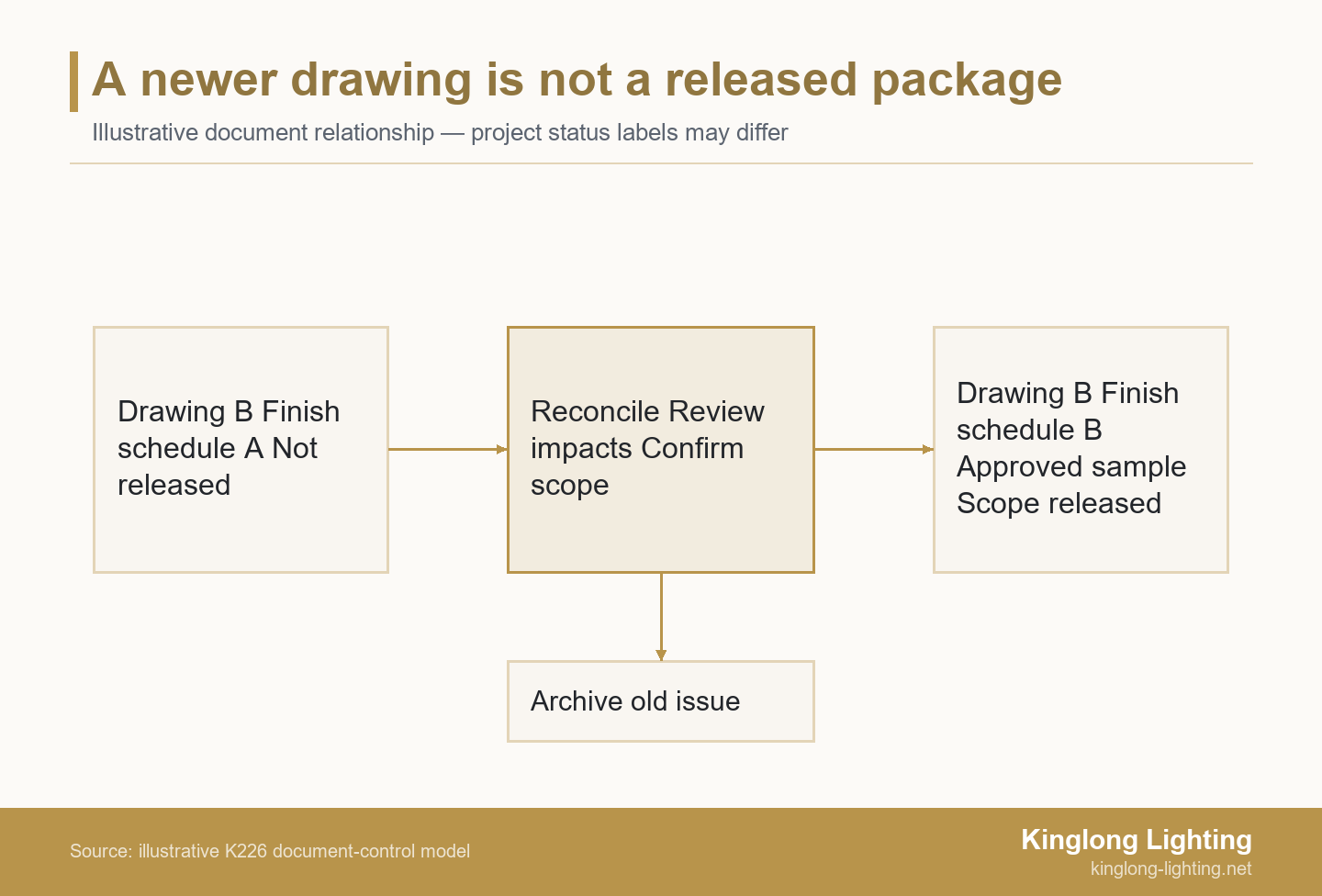
The illustrative order contains 18 pendants. The 12 lobby pendants and 6 restaurant pendants have separate finish decisions; the warmer-finish request covers only the 12 lobby pendants. Lobby drawing B names the proposed finish, but finish schedule A still names the original finish. The restaurant group has a separate unchanged decision. An aesthetic approval for the lobby does not resolve this conflicting document combination.
The coordinator records the source comment and the excluded restaurant group, then holds the lobby pendants from coating release. The hold is specific to the changed scope; the restaurant group remains under its separate existing release instruction. The request also asks whether the warmer process changes the quotation or lead time, and whether a new sample is needed. Those questions remain open until the designated reviewers answer them.
To resolve the request, the supplier aligns the lobby finish schedule with drawing B and identifies the physical sample submitted for approval. Procurement reviews the reported commercial impact, and the authorized design reviewer accepts the named finish sample. The coordinator then records a release decision for the lobby group with its exact document combination. None of these steps is replaced by changing the register’s status cell to green.
Verify the Matching Package Before Fabrication
Before closing the request, match the revised drawing, finish schedule, approved sample and release instruction in the actual workshop package. Ask the recipient to acknowledge the identified documents, and check that the superseded finish issue is no longer offered as a current instruction. This example illustrates a verification step, not a claimed successful production run or a guaranteed result.
Photographs cannot establish whether a particular revision reached the workshop correctly. Ask separately for the fixture-specific documentation and approval arrangement relevant to your proposed package. To assess the types of spaces and decorative work a manufacturer presents, you can also review its project portfolio.
A release package is the compatible set of controlled documents and decision references permitting a stated use. Compatibility does not mean identical revision letters. In this illustrative change, the lobby drawing and finish schedule both move to B, while an unaffected glass reference can remain at its existing issue.
| Reference | Lobby group | Decision role |
|---|---|---|
| Fixture drawing | B | Names changed frame finish and applicable fixture tag |
| Finish schedule | B | Matches the approved finish reference |
| Glass reference | A, reviewed unchanged | Confirms that this request does not change the glass |
| Physical finish sample | Named approved sample | Establishes the accepted appearance within its stated scope |
| Release instruction | Lobby coating scope | Permits the identified work after open impacts are resolved |
The register closes the conflict by identifying a compatible combination, not by forcing every file to carry B. Preserve the original combination in the history so that later enquiries can reconstruct what changed and when it became usable.
Autodesk’s change-management documentation distinguishes working versions from released revisions and describes marking previous revisions as superseded. That is a software-specific implementation of a useful distinction, not a requirement to purchase that platform. A simpler project register can still identify which issue is usable and which has been replaced.
Handle Changes After Materials or Fabrication Are Committed
A late change needs a disposition for already committed items as well as an instruction for remaining work. Identify ordered material, completed components and ongoing operations separately. Reissuing a drawing cannot determine whether an existing component should be retained, reworked, replaced or held for review.
Ask the supplier for the current work status against the affected fixture tags before discussing implementation. Record the basis and date of that response. If some parts remain usable, distinguish them from parts requiring a new decision; avoid an undifferentiated instruction to “change the whole order.” Cost acceptance and schedule acceptance should refer to the same implementation scope.
The decorative lighting value-engineering guide offers an adjacent way to compare what a proposed saving changes. Apply that comparison to the current revision: identify what appearance or performance is retained, what is altered and which committed costs remain. A lower revised unit price does not establish a lower total project cost if earlier work still needs a disposition.
Microsoft’s version-history guidance describes viewing and restoring previous files in OneDrive or SharePoint. Such recovery can preserve access to earlier information, but restoration is not a new project approval. If the team restores an earlier drawing, record the reason and confirm whether its previously associated decisions still apply.
Keep rejected proposals and withdrawn requests in the history, with their decision references. Mark obsolete documents so they cannot be confused with the active issue, while retaining a traceable archive. If two branches of a fixture design remain valid for different locations, identify both scopes rather than describing one branch as universally superseded.
Finally, confirm how the revised instruction reaches the people performing the affected operation. An email sent to procurement is not evidence that a coating team or installation coordinator has the intended package. Name the recipient, retain acknowledgement and check the active references. Close the request only to the extent that these actions have actually been completed.
Send a Revision Brief the Manufacturer Can Resolve
A useful revision enquiry includes the baseline package, marked-up request, affected fixture quantities and locations, finish or prototype sample references, and open impact questions. Add the intended approval responsibilities so the manufacturer can distinguish a design discussion from an instruction to proceed.
State the decision you need next: feasibility of a changed detail, a revised sample, clarification of dependent documents, or a quotation against the proposed scope. Tell the supplier which elements remain accepted and which are unresolved. If an owner or operator has commented without holding purchasing authority, identify who will accept the commercial consequence.
The completed register should leave each participant able to answer three practical questions: what changed, what exact information defines the accepted result, and what work may now proceed? Where an answer remains unresolved, retain the named action and hold rather than presenting the package as fully released.
Ask Kinglong Lighting how its blueprint and sample-review process can address the proposed change, then agree the next documentation and approval scope for the specific project. The enquiry is not a promise of a fixed revision turnaround or a substitute for the project’s release authority. With the baseline, marked-up request, fixture scope, sample references and impact questions assembled, send the fixture revision brief.
Custom Lighting Revision Log FAQ
Is a spreadsheet enough for a custom lighting revision log?
Yes, if it identifies controlled files, records decisions and restricts who can change release status; a spreadsheet alone does not provide that discipline. Use stable document links, agreed status meanings and a named register owner. Preserve approval evidence outside the cell as a linked record. More complex packages may justify a document-management or change-management system, but evaluate the required permissions, history and cross-document relationships before selecting a tool. Software cannot resolve an undefined approval scope.
Can a finish sample approval release the whole fixture?
No: approval of a finish sample covers the stated aesthetic scope unless the agreed decision explicitly includes the complete manufacturing package. The sample may settle color and surface appearance without resolving mounting information, controls, dimensions or commercial changes. Record the sample identifier and what the reviewer accepted. If manufacture depends on other decisions, leave those conditions open and identify the permitted stage. Do not interpret a general “looks good” message as authorization for every dependent operation.
Do rejected changes need to stay in the log?
Yes: retain the rejected proposal and its decision so that the same marked-up drawing is not later mistaken for an active instruction. Record whether the request was rejected, withdrawn or replaced, together with its source and affected scope. Keep historical files available through the archive while clearly separating them from current instructions. A later request can reopen the issue under a new identifier and decision trail, rather than erasing the earlier review or quietly restoring the rejected file.
Should drawings and finish schedules share the same revision letter?
Not necessarily: each controlled document can have its own revision, while the release package records the exact compatible combination and permitted use. A drawing may advance because geometry changes, while a reviewed finish schedule remains valid. Conversely, a finish-only change may advance the schedule without changing the drawing’s geometry. Follow the agreed project numbering convention and record dependencies explicitly. Matching letters are convenient in some packages, but they do not prove that the contents or approval scopes agree.