
A project lighting asset register is an operational record connecting each installed lighting asset to its location, configuration and service information. For an owner approaching handover, its value is practical: facilities staff should be able to identify a particular fitting and retrieve the information that applies to it. A folder of approved drawings is useful, but it does not necessarily reveal which revision was installed in a particular room.
Make the Register Answer a Maintenance Request
A useful register lets staff find the fixture, identify its installed version and retrieve the right service information. Build it around the questions raised by a maintenance request, rather than the order in which suppliers submitted files.
- Which physical light needs attention, and where is it?
- Which type and revision describe its actual installed configuration?
- Where are its applicable drawings, service instructions, warranty terms and spare-part references?
- Who confirms missing information and updates the record after work?
Agree this information scope with the facilities team before closing the handover package. Their naming conventions, access arrangements and maintenance system should shape the usable record. The template below is a proposed working structure, not a claim that every project requires the same fields or software.
Separate Each Installed Light from Its Shared Type
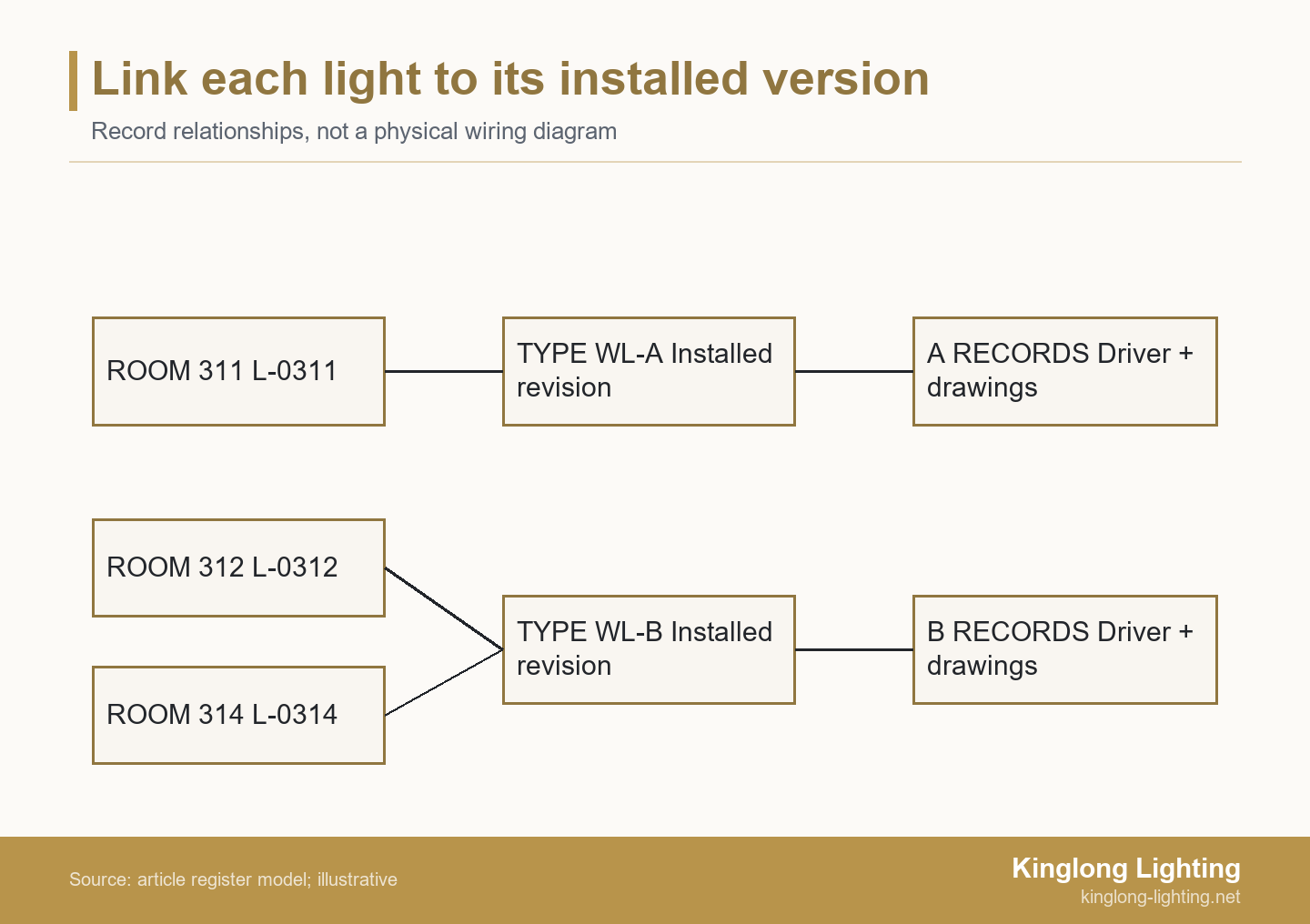
Keep a unique installed asset ID distinct from a shared type code and revision. The asset ID identifies the physical fitting; the type record describes the configuration that fitting uses. Several identical wall lights can share one type record without sharing one asset ID. Conversely, similar-looking lights may need different type records when their installed components differ.
Construction to Operations Building information exchange (COBie) makes a related distinction: its Type and Component tables separate product-type information from individual component records, including location, installation date and warranty-start date. This relationship is useful even if the owner is not requesting a formal COBie deliverable. The simplified template here is not a declaration of COBie compliance.
For supporting document preparation, use the lighting specification and procurement resources to frame the questions for the project team. Then agree the actual identifiers used on this project. Keep room names and drawing locations in separate fields so a renamed room does not silently create a different asset. Record a manufacturer serial number where one exists, but do not confuse it with an owner-assigned tag.
Build the Lighting Asset Register in Linked Layers
Use instance rows for installed locations and service history, linked to shared type records, documents and spare-part references. Store a shared manual once and link the relevant types to it; do not create uncontrolled copies for every room. Where an approved change produces a different service configuration, identify the changed type revision and the installed assets affected.
The older COBie 2.4 technical annex includes separate product-type parts, warranty and maintenance exchanges, with fields for finish and warranty information. It illustrates the range of information involved; its older exchange structure should not be mistaken for the current project’s agreed submission specification.
Copy this field map into the owner’s workbook or information requirements. Replace each entry prompt with a confirmed value or a tracked information gap. References should identify the document and revision, not simply say “see drawings.”
| Layer | Fields | Entry to complete | Confirmation or source |
|---|---|---|---|
| Installed asset | Asset ID; location | Owner tag; building, level and room; plan reference | Installer mapping checked against the physical fitting |
| Installed configuration | Type code; revision; supplier model | Applicable type and approved change reference | As-installed schedule and confirmed supplier record |
| Service components | Driver, light source and controls references | Actual installed identifiers; linked component data | Confirmed installed configuration, not a generic family sheet |
| Decorative components | Finish; glass or crystal parts; care | Finish reference; component drawing; care instructions | Approved material record and applicable maintenance guidance |
| Documents | Drawing; manual; access instructions | File reference, revision and working link | As-installed package and relevant service documents |
| Warranty | Start trigger; date; terms; contacts | Applicable terms reference and parts/labor responsibilities | Actual warranty documents and agreed project records |
| Spares | Part code; applicable type; stock location | Confirmed reference, quantity and storage bin | Supplier parts information and facilities stock check |
| Maintenance and access | Task; instruction; access constraints | Applicable procedure and responsible team | Service guidance and project-specific access arrangements |
| Change control | Work reference; date; updater | Completed change, current record and superseded reference | Closed work order and authorized configuration record |
Distinguish “not applicable” from “not yet supplied.” A fitting without a replaceable lamp needs a different entry from a fitting whose lamp information is missing. Give unresolved items an owner and a follow-up date. Avoid filling gaps with assumptions merely to make the workbook look complete.
Record What Can Actually Be Serviced
Record the actual installed service configuration. Appearance and a generic family name do not establish interchangeability. For a bespoke decorative fitting, identify the applicable driver or light-source reference, control arrangement and relevant component documentation. Keep confirmed replacement guidance separate from a proposed alternative that still needs review.
Digital information is useful only where the installed equipment supports it. The DALI Alliance’s data guidance says luminaire, energy and diagnostics data are optional for DALI-2 certification, while all three data parts are mandatory for D4i LED drivers. Do not assume every DALI installation provides the same information or that reading a data field establishes replacement compatibility.
Decorative parts need equally precise identification. A photograph can help locate the fitting, but a finish reference or component drawing is a more useful starting point for a replacement enquiry. Preserve the applicable cleaning instructions and any stated restrictions. Do not substitute a general cleaning recommendation for guidance on the actual finish or decorative material.
Kinglong’s published hotel lighting delivery and installation scope describes installation support, commissioning and final sign-off documentation. Confirm which records are included in the actual project agreement. That published process does not by itself promise a complete owner asset database, a COBie export or a maintenance audit.
For access-dependent tasks, link the relevant instructions and identify any coordination needed with other building systems or finishes. Electrical work and replacement suitability remain matters for the responsible qualified specialists. The register helps them retrieve the correct information; it does not authorize a repair or replace technical checks.
Test the Handover from the Facilities Desk
Walk from a real fixture to its register row, applicable documents and spare-part references, then reverse the lookup. Can a facilities user start with an asset ID in the workbook and find the correct fitting on the plan? Record broken links, unclear locations and mismatched revisions as information defects with named owners.
Use the operations team’s account for the test. A link that opens for a project administrator may depend on permissions that disappear after handover. Check a representative selection covering different locations and configurations, and resolve every known changed configuration. Agree the selection with the owner; a convenient sample is not evidence that all records have been verified.
Allocate corrections to the party with the evidence. The installer can confirm installed locations and approved site changes. The supplier can clarify the product and component references within its scope. Facilities can check searchability, storage locations and working access. The owner or appointed coordinator should track closure rather than accepting several disconnected “final” files.
Keep information acceptance separate from physical commissioning and other project approvals. A complete row does not prove the fitting was correctly installed, and a successful lighting demonstration does not prove its service files are usable. Record what each check establishes and what remains outside it.
The decorative lighting project portfolio provides visual context for discussing installation types and access questions. Portfolio images are not evidence of the asset records, maintenance history or service outcomes for the owner’s installation. Obtain those records from the actual project package.
Example: a Repeated Wall Light with Two Installed Versions
In this illustrative handover, keep six changed wall lights linked to their own installed revision rather than applying a generic spare record to all sixty-four wall lights. The decision turns on the recorded configuration, not on whether the fittings look alike.
Two Versions Hidden by One Family Code
An owner representative and facilities manager are preparing a hypothetical hotel for handover. The package contains 64 wall lights and 2 decorative pendants. Installation is complete and a generic fixture schedule has been submitted, but the links between installed assets and type revisions have not been verified. This is a constructed example, not a Kinglong project or a reported client result.
A group of 6 wall lights uses a separately approved driver configuration, yet the generic schedule sends every wall-light record to the original type sheet. A second problem appears in the spares list: it identifies only the original WL-A configuration. The facilities team therefore cannot establish the applicable replacement reference for the six changed locations from the submitted package. Similar appearance has concealed a documentation difference that matters to service decisions.
The team holds the replacement-information decision for those six assets until their installed revisions are confirmed. The supplier confirms the distinct WL-A and WL-B type records and applicable component references. The installer identifies the six affected asset IDs and locations. Facilities then corrects their document and parts links instead of changing the shared reference for every wall light. The pendants retain their own records.
Facilities tests a lookup from each configuration and checks that all six changed asset records point to the confirmed WL-B information. If the component reference is still unresolved, that gap stays open rather than being replaced with an assumed part code. This illustrative example verifies the recorded mapping, not electrical suitability or the condition of every fitting. A qualified specialist still needs to confirm any proposed replacement against the applicable requirements.
Keep the Record Current After Repairs and Replacements
Record completed work against the installed asset, retain superseded information and confirm the current service configuration. If a proposed substitution changes the approved design or construction, the decorative-lighting value engineering guide explains why the changed option needs an identified review. Update the operational record after the authorized change, not while an alternative is merely being discussed.
Assign an update owner within the maintenance workflow. A closed work order should identify the affected asset, work date, installed replacement reference and any revised documents. Preserve the earlier configuration so another technician can understand why an old manual no longer applies. Where a service task changes no configuration, record the work without inventing a new product type.
A computerized maintenance management system (CMMS) can hold these relationships, but the information still needs ownership. The 2010 DOE operations and maintenance guide lists work-order history, maintenance procedures, warranty information and technical documents by component among possible CMMS functions. This is a description of possible functions, not evidence that any particular system contains complete lighting records.
Hand Over a Usable Dataset, Not Just a Viewer
Agree a searchable export with working document references and test access using the operations account. A polished project viewer is not enough if the owner loses access when the construction team leaves. Confirm who controls the records, where supporting files reside and how an updated copy can be retrieved.
Check the actual export capability rather than assuming the software name answers the question. Procore currently documents Excel, PDF and ZIP asset exports including attributes, attachments and change history, and says COBie-formatted export is not currently available. This product-specific example is a reason to test the requested deliverable, not a recommendation of software or a claim about Kinglong’s systems.
A PDF may be a useful reading copy, while a structured workbook or agreed import file supports searching and updates. Test the exported relationships as well as opening the file: asset IDs should still lead to the applicable type and accessible documents. Relative folder links, renamed files and restricted cloud attachments can break an otherwise readable handover. Agree a maintainable folder and reference convention before treating the export as complete.
Agree the Supplier Inputs Before Closing the Package
Identify missing project records and agree which documentation and support fall within the actual supply scope. Bring the current fixture schedule, as-installed drawings, approved changes and a short list of unresolved records. Include the facilities team’s preferred file format and the person responsible for maintaining it.
Use those inputs to discuss the lighting documentation scope with Kinglong. Ask which product references and supporting documents can be supplied, which installed-location details need confirmation by the project team, and who closes each remaining gap. The objective is a traceable handover package with agreed responsibilities, not an unsupported promise that one supplier owns every record.
Frequently Asked Questions
Is a spreadsheet enough for a lighting asset register?
Yes, if it has stable asset and type identifiers, usable document links and a controlled update owner. Test the workbook with the people who will maintain it. Software choice alone does not establish completeness; a structured spreadsheet can be more useful than a sophisticated viewer with missing revisions. Confirm any required system-import format separately.
What if a bespoke fixture has no manufacturer serial number?
Use an agreed owner asset ID and record that no manufacturer serial number is available. Do not invent one. Link the owner ID to the installed location, type revision and applicable documents. Agree how the fitting will be identified in the field without damaging decorative surfaces or obscuring required labels.
Does the handover date automatically start every warranty?
No. Record the start trigger and date established by the applicable warranty terms rather than assuming one project-wide start. Keep the terms reference and responsible contact with the record, and distinguish parts and labor responsibilities where relevant. If the trigger or date is unresolved, ask the responsible parties to clarify it instead of populating a convenient default.
What if a supplier cannot provide a replacement-part code?
Keep the gap visible and agree a confirmed identification route, such as an applicable component drawing or a supplier enquiry using the asset’s type revision. Photographs can support identification but do not establish compatibility. Record who must respond and what evidence is needed before the responsible specialist can select a replacement.